Alcove documentation
Alcove is a privacy-preserving record linkage (PPRL) tool that enables partner agencies to identify shared members across administrative datasets without revealing anything about the records they do not have in common. It implements a private set intersection (PSI) protocol available both as a browser-based web application and a containerized CLI, and is designed to work within the policy and infrastructure constraints typical of government agencies.
Role-based reading guide
| I am a... | Start with... | Then read... |
|---|---|---|
| Analyst running one exchange in the browser | WEB_APP.md | MANAGED_EXCHANGE.md, for running it again on a schedule |
| Partner who received an invitation | WEB_APP.md | PRIVACY.md |
| Program officer evaluating the software | DESIGN.md | SECURITY_DESIGN.md, COMPLIANCE.md |
| Security reviewer or auditor | SHARED_RESPONSIBILITY.md | SECURITY_DESIGN.md, PROTOCOL.md, CHANNEL_SECURITY.md, COMPLIANCE.md |
| Compliance officer | COMPLIANCE.md | PRIVACY.md, SECURITY_DESIGN.md |
| Privacy reviewer | PRIVACY.md | COMPLIANCE.md, SECURITY_DESIGN.md |
| IT professional operationalizing an exchange | CLI.md | EXCHANGE_REFERENCE.md, DEPLOYMENT.md |
| Operator running one exchange from a graphical console on their own machine | CONSOLE.md | CLI.md, EXCHANGE_REFERENCE.md |
| Operator running a recurring exchange from the browser | MANAGED_EXCHANGE.md | SECURITY_DESIGN.md, MANAGED_EXCHANGE_RECORD.md |
| Developer contributing to the project | DESIGN.md | PROTOCOL.md, COMMUNICATION.md, FILE_SYNC.md, CONTRIBUTING.md, TESTING.md |
| Maintainer upgrading a pinned dependency | CONTRIBUTING.md | DEPENDENCY_PINS.md, PREBUILD_REVENDOR.md |
| Partner agency whose IT staff run the command line app | CLI.md | EXCHANGE_REFERENCE.md |
Glossary
The screens, messages, and guides use the words below. Configuration keys, command-line flags, environment variable names, and code keep their own names.
| Word | What it names | Where it is set |
|---|---|---|
| Alcove | This software, on either side of an exchange | - |
| partner | The other party to an exchange; "you" and "your" are this party | - |
| invitation | What one party sends the other to set up an exchange: the proposed terms, a short-lived secret, and optionally where to meet. It is sent as a link to the web app or as text to paste | alcove invite, alcove accept, alcove exchange --invitation (CLI.md) |
| quick exchange | An exchange with no invitation and no shared secret, run against a server or shared folder both parties already agreed on | alcove URL INPUT_FILE, or the console's quick exchange; --save keeps its settings (CLI.md) |
| shared folder | The folder both parties read and write when an exchange runs through files: a network share or a synced folder | connection.channel: filedrop with connection.path, or inbound_path and outbound_path; on the console, JOB_RENDEZVOUS_DIR |
| coordination server | The server two parties connect through to start a WebRTC exchange; it passes setup messages and never sees exchange data | connection.channel: webrtc with connection.server; for the web app, VITE_SIGNALING_SERVER_URL (DEPLOYMENT.md). Code and the package name call it the broker |
| working folder | The one folder the console mounts, holding an exchange's configuration, key file, input, and results. Console screens call it "your folder" | JOB_DATA_ROOT (CONSOLE.md) |
| exchange record | The file each party keeps of what its exchange disclosed, alcove-record-<time>.json, with its verification keys | Written by default; --no-record turns it off |
| signed receipt | The file both parties sign at the end of an exchange, alcove-receipt-<time>.json: the evidence of the terms both agreed on and the data that flowed | signing.mode: certificate |
Document inventory
The documentation is organized in three tiers: this overview tier (docs/) of conceptual and operational documents; a technical specification tier (docs/spec/) of wire formats, byte encodings, normative constants, and implementation-level design for implementors and auditors; and a design notes tier (docs/notes/) of citeable, non-normative design records: the model behind a mechanism, the options weighed, and the decisions taken. The spec and notes tiers each have their own index.
Guides (docs/guides/)
Step-by-step instructions for one reader's path through an exchange: agreeing on the terms with a partner, then inviting, accepting, and scheduling in the web app, the console, or the command line. Each guide links into the overview documents below for depth. On the project site the guides are a section of their own at the site root.
Overview (docs/)
- WEB_APP.md - running one exchange in the browser: creating or accepting an invitation, the results, and the exchange record
- MANAGED_EXCHANGE.md - running that exchange again on a schedule from the browser: saving, installing, the schedule, moving it, failed runs, the accounting of disclosures, and backups
- CLI.md - IT staff running exchanges from the command line: a task index, a first recurring exchange, every command, scheduling, recovery, and exit codes
- EXCHANGE_REFERENCE.md - every field of the exchange configuration file,
alcove.yaml - CONSOLE.md - running one exchange from the graphical console on your own machine: the container, its mounts and settings, and the hand-off to the command line
- DEPLOYMENT.md - IT staff hosting Alcove: the supporting services, network requirements, how large an exchange can be, and the command line app under Docker
- FIPS_SFTP_PROFILE.md - the SFTP settings for an agency required to use FIPS-approved cryptography, what they exclude, and the host-key gap
- DESIGN.md - the whole picture: what Alcove does, its architecture, the configuration in summary, and the user journey
- SECURITY_DESIGN.md - the PSI privacy guarantee, the threat model, authentication, channel security, and key rotation
- SHARED_RESPONSIBILITY.md - what the project is responsible for and what the deploying agency is, per deployment
- COMPLIANCE.md - regulatory framings, data classification, and what a reviewer checks
- SERVICE_FACT_SHEET.md - one page of facts, for counsel, about each service the project runs for the hosted web application
- COMMUNICATION.md - how an exchange proceeds: the channels, synchronization, the web invitation and consent screens, message delivery, error handling, and the supporting services
- INCIDENT_RESPONSE.md - how the maintainer handles a reported vulnerability, behind SECURITY.md, and the tabletop exercise record
- RELEASES.md - the versioning policy, the release checklist, and verifying the published artifacts
- PREBUILD_REVENDOR.md - replacing the vendored native PSI build: the integrity controls, the procedure, and chain of custody
- TESTING.md - where a test goes, the integration backends and profiles, the console check, the browser suite, and coverage
- ROADMAP.md - what is planned next
Technical specifications (docs/spec/)
- PROTOCOL.md - the PSI and PSI-C algorithms, linkage, the steps after linkage, and the P-256 key exchange
- CHANNEL_SECURITY.md - the application-layer encryption and the authenticated abort marker
- TRANSPORT_BOUNDS.md - memory bounds on what a hostile server or partner writes for a party to read
- TRANSPORT_LIVENESS.md - the deadlines that fail a stalled transport operation, and the SFTP heartbeat
- SFTP_CONNECTION.md - the server-provisioning call, SFTP crash safety, and host-key verification
- SFTP_SESSION_RECOVERY.md - how a dropped SFTP session is re-dialed, and its bounds
- PARSED_INPUT_BOUNDS.md - bounds on a partner's input, the CSV-read ceiling and header sanitation, and the linkage-terms name rule
- TRANSFORM_REGEX_DIALECT.md - the linear-time regular expression dialect of partner-authored transforms, and its bounds
- TRANSFORM_PARAMETER_BOUNDS.md - the type of each transform parameter, and the bounds on per-row work
- DISPLAY_ESCAPE.md - how partner- and server-chosen text is escaped where it is shown
- DISPLAY_REDACTION.md - how private-key material is removed from what is shown, and the length budgets
- SIGNALING_SERVER_BOUNDS.md - the bounds the coordination server holds against an unauthenticated client
- FILE_SYNC.md - the
sftpandfiledropchannels: the shared folder as a state machine, file names, and preconditions - WEBRTC_TRANSPORT.md - the
webrtcchannel: rendezvous roles, signaling messages, data-channel framing and close, the ICE list rule, and limits - EXCHANGE_RECORD.md - the exchange record: its files, the commitment scheme, governance metadata, and privacy properties
- EXCHANGE_FILE.md - the exchange file the web app downloads, its versioning, the invitation channel-binding rule, and key file provisioning
- INVITATION_TOKEN.md - the invitation token's encoding, fields, size bounds, and the checks on minting and accepting it
- DEFAULT_STANDARDIZATION.md - the default cleaning per data type, and the column-name table behind the inferred defaults
- CANONICAL_ENCODING.md - the RFC 8785 encoding that receipts, record commitments, and the agreed-terms hash are computed over
- CREDENTIAL_STORAGE.md - how the key file, signing identity, exchange record, and result CSV are written owner-only and durably
- MANAGED_EXCHANGE_RECORD.md - the record a recurring web exchange stores, the save-before-success order, the one-owner rule, and the export file
- CLI_EVENTS.md - the opt-in
--event-streamoutput: framing, event types, error categories, and sanitization - CLI_DOCTOR.md - the
alcove doctor --jsondocument: fields, schema version, status values, checks, and exit codes - SERVER_JOB_API.md - the console's job API: request schema, SFTP connection, lifecycle, working-folder layout, event relay, and startup rules
- DEPENDENCY_PINS.md - the exact-pinned SFTP and WebRTC stack, the upgrade checklists, and the install-script policy
- CONTAINER_IMAGES.md - the standard and FIPS images: dependency pinning, the FIPS provider's CMVP certificate coverage, and the writable and setuid inventories
Design notes (docs/notes/)
Tracked, citeable design records: the model behind a mechanism, the options weighed, and the decisions taken. Nothing here binds an implementation; a note points at the spec for the normative rows. Its index lists each note with its status and holds the maturity ladder from scratch/ up to the formal tiers.
The web application's interface has its own record outside this tree: design/web-redesign/ holds the chosen redesign as a non-functional HTML mockup, with the framing, the alternatives weighed, and the civic-design sourcing behind it. apps/web/src/exchange/, apps/web/src/recurring/, and apps/web/src/console/ implement that direction.
System architecture
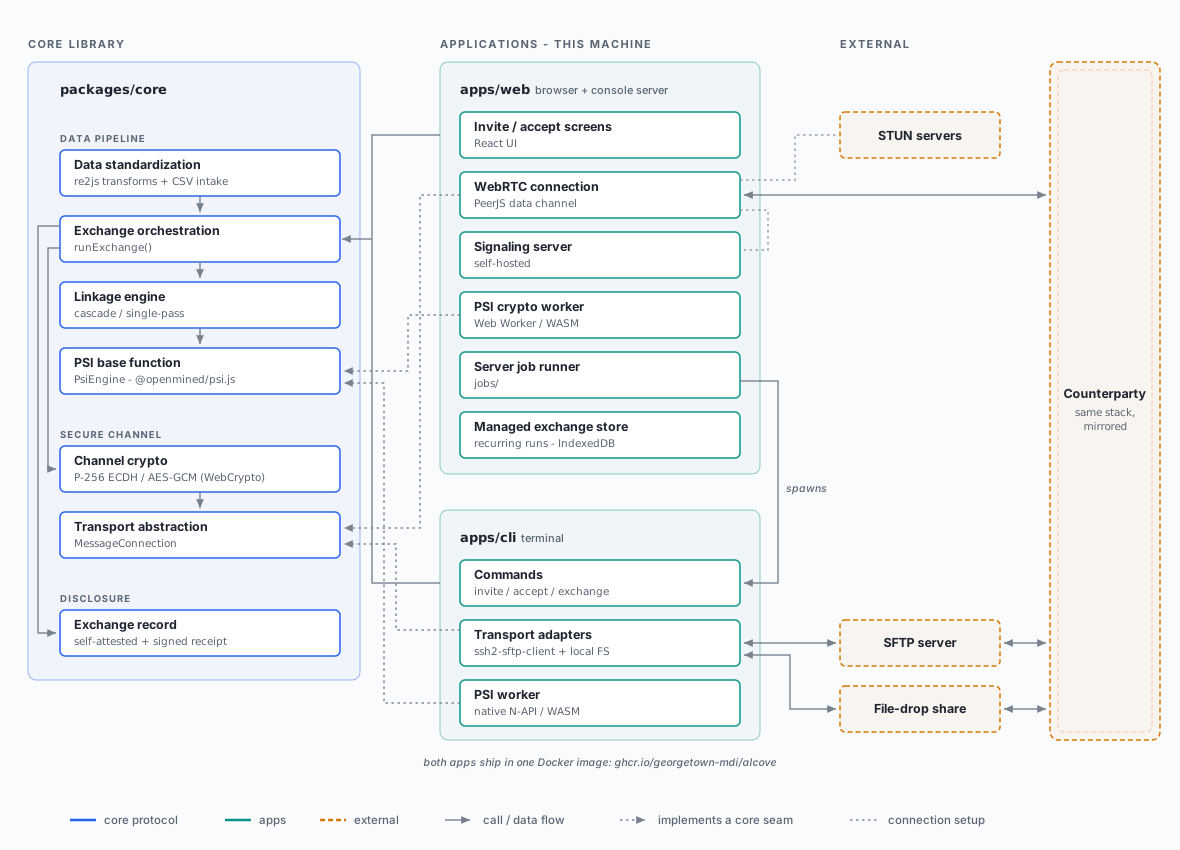
One library, packages/core, holds the protocol; the apps supply what core leaves abstract - the transport channel (MessageConnection) and the PSI compute backend (PsiEngine). Both apps ship in one Docker image. DESIGN.md narrates this architecture; the spec tier holds the wire-level detail.
To revise this diagram or add another figure to the docs, follow the doc-figure skill (.claude/skills/doc-figure/SKILL.md).